2D CAD tool · free
How to draw an arc in 2D CAD
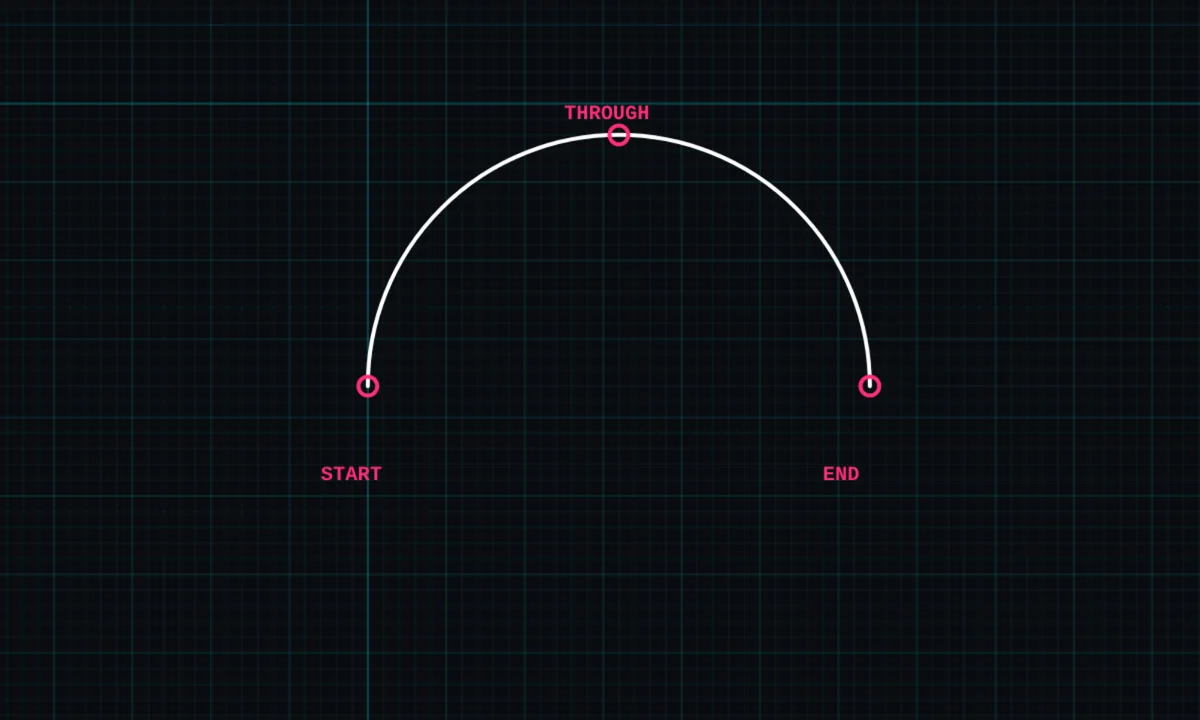
The arc tool draws part of a circle through three points: where it starts, where it ends, and one point it passes through. It is how you draw bays, curved walls and door swings.
Opens BenCAD with arc ready. No download, no sign-up.
How to use arc in BenCAD
- Pick ARCTap ARC in the toolbar, in the Shapes group.
- Tap the start pointTap where the arc begins. It snaps to the grid and to end points.
- Tap the end pointTap where the arc finishes.
- Tap a point it passes throughTap a third point to set how far the arc bows out. The arc is drawn through all three.
Tips
- Arcs can be trimmed, extended, offset and dimensioned with a radius (R) dimension.
- Drag an arc's end round with extend; if the ends meet, it becomes a full circle.
Questions
How do I dimension an arc?
Use DIM and choose radius, then tap the arc. Arc length dimensions are available too.
Related tools
CircleCentre and radiusCurve (spline)Smooth curves through pointsTrimCut lines back to where they cross
More tools: all 2D CAD tools in BenCAD.