An HMO conversion has a constraint that a normal house layout doesn't: every bedroom has to clear a minimum size set by your local authority's licensing rules, and those minimums vary by council. Get the layout wrong and you find out after the walls are up, when a licensing inspection fails a room you've already fitted out.
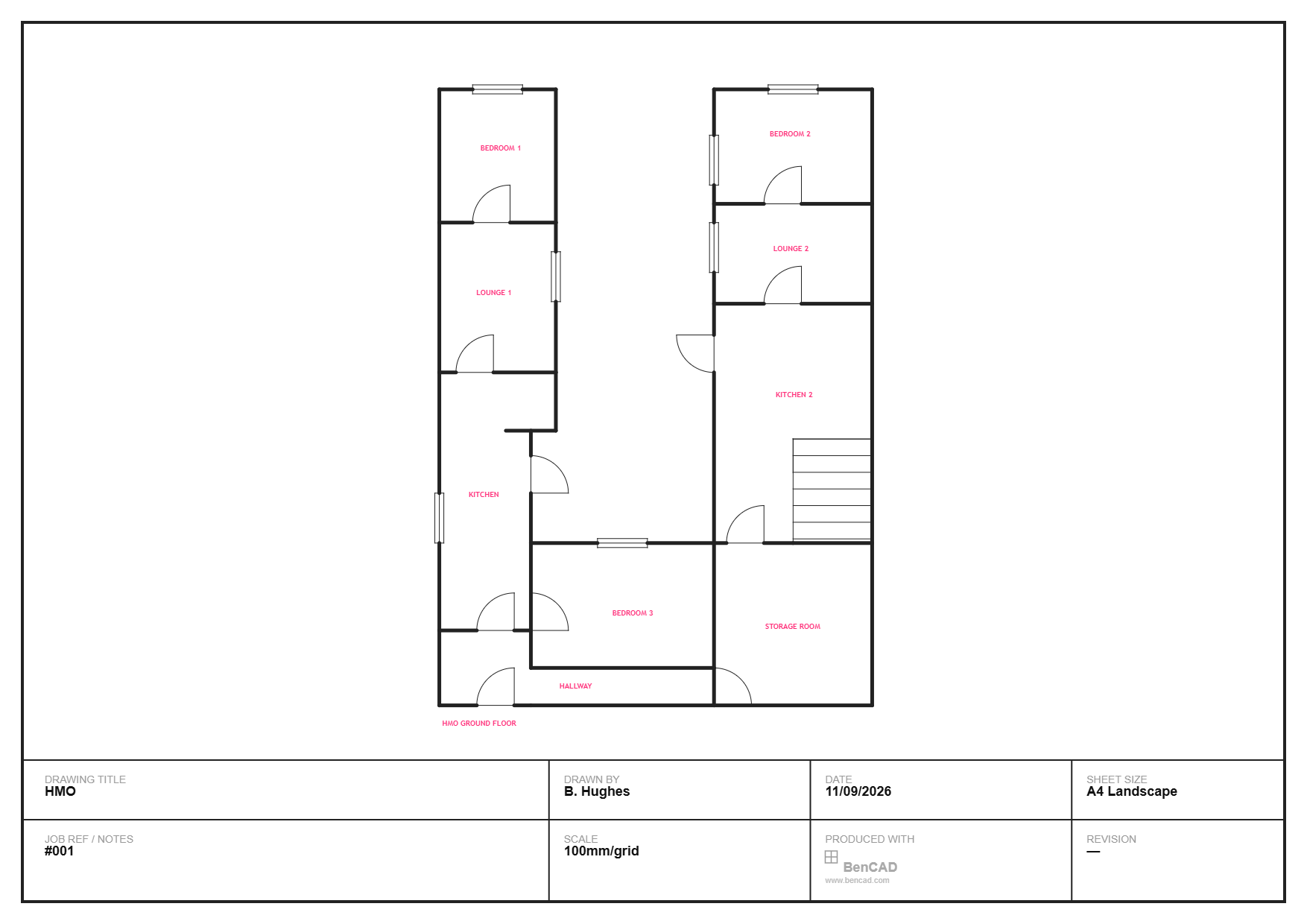
Here's a real HMO ground floor layout, drawn in BenCAD, to walk through how that gets planned properly before any work starts.
Check every bedroom against your council's minimums before you commit
This is the single most important step in HMO layout design, and it's the one that's cheapest to get right at the sketch stage and most expensive to get wrong after conversion. HMO licensing minimum room sizes are set locally, not nationally — a bedroom that's compliant in one council area can fail in another. Sketching the layout to scale first, with real room areas calculated as you draw, means you can check each of the three bedrooms in this layout against your specific council's rules before a single wall gets built.
Separate lounges reduce shared-space friction
This layout includes two separate lounges rather than one shared living room — a deliberate choice in HMOs where tenants are unrelated and don't necessarily want to share a sitting room with strangers. It costs floor area that a single larger lounge wouldn't, but it's often what actually makes a property lettable at HMO rates, since shared-space friction is one of the most common tenant complaints in poorly-planned HMOs.
One kitchen serving multiple households needs realistic capacity
A single kitchen serving three or more bedrooms needs enough worktop, storage and appliance space that it doesn't become a bottleneck at peak times. It's worth deliberately oversizing the kitchen relative to what a single-family layout would use — cramming it into whatever space is left over after the bedrooms are placed is a common HMO planning mistake that shows up immediately once tenants move in.
Don't skip dedicated storage
The storage room in this layout is easy to view as wasted lettable space, but HMOs without any communal storage tend to end up with tenants' belongings cluttering hallways and shared areas — which becomes a fire safety issue, not just a tidiness one. A dedicated storage room, even a small one, is one of the cheaper ways to keep the rest of the property usable.
Plan the hallway as fire escape route, not just circulation
In a single-family house, the hallway is just how you get from room to room. In an HMO, it's also the primary escape route for everyone in the building, and fire safety requirements for HMOs are considerably stricter than for standard rented housing — things like fire doors, protected escape routes and interlinked alarms are usually mandatory, not optional extras. The hallway's width and the position of every door onto it should be checked against your council's HMO fire safety guidance, not just against what fits.
Bedroom 3's position matters as much as its size
Bedroom 3 sits at the rear of this layout, away from the front two bedrooms and the lounges — giving each tenant a degree of separation from the others rather than three bedrooms clustered together with paper-thin acoustic privacy. Where possible, spacing bedrooms apart (or separating them with a lounge or kitchen rather than a shared wall) reduces one of the most common HMO tenant complaints: noise from the room next door.
Sketch it, check it, then commission the real drawings
As with any conversion, BenCAD is the tool for the stage before you commit — testing whether a layout is even viable, checking room sizes against your licensing minimums, and working out where walls, doors and fire escape routes need to go. Once the layout is proven, that sketch becomes the starting point you hand to whoever produces your formal HMO licensing application drawings, rather than a blank page.